Blog

  • Karma Kickstart: The Easy Way to Build Your Tyrian Savings

    With Anet bringing back a reason for players to use up their excess Karma currency, this guide will help new, returning, and veteran players stack that Karma. We will go over some quick ways to gain karma and items that can be used to boost karma gathering.

    The Basics: Level 1 to Fresh 80 Fundamentals

    If you just installed Guild Wars 2 and are staring at a growing pile of purple triangles in your wallet, welcome to Tyria! Before you start worrying about maximizing buffs, buying gobblers, or running meta trains, here is exactly what you need to know about Karma as a new player.

    • How you earn it naturally: You get Karma just by playing the game. Completing Renown Hearts (the golden hearts on your map), participating in orange Dynamic Events, and doing your Personal Story quests will passively fill your wallet as you level. Adding a Karma buff, like from food, for example, helps with later game content if you add one early on.
    • What you should spend it on early (Level 1โ€“79): While levelling, do not buy gear on the Trading Post with Gold. Instead, whenever you finish a Renown Heart, that NPC turns into a Karma Merchant. Talk to them and use your Karma to buy level-appropriate weapons and armour to keep your stats topped up for pennies.
    • The “Fresh 80” Milestone: The moment you hit Level 80, your first major goal is to get a full set of Exotic-tier armor. Instead of spending your Gold, head to the Ruins of Orr. The Temple Karma Merchants (like the Temple of Balthazar or Temple of Grenth) sell level 80 Exotic armour pieces for 42,000 Karma each. A full set costs 252,000 Karmaโ€”a massive gold saver that immediately makes your character ready for Fractals, expansions, and endgame maps.
    • The Golden Rule: Outside of buying levelling gear and your first set of level 80 Temple armour, hoard the rest of your Karma. Do not worry about the hardcore buffs or account upgrades listed below until you are actively running endgame meta trains, grinding, etc!

    Newest Karma Boosting Enhancement Items

    The Snow Diamond Ornament is currently one of the best for utility buffs. You can craft it after purchasing a recipe from the Wintersday Vendor in Hooligans Route or grab it straight off the Trading Post.
    Itโ€™s a utility enhancement that lasts for 30 minutes and offers a massive +20% Karma bonus.
    Remember: Only one utility item enhancement can be active at a time.
    You can, however, stack it with your standard Food buff for even higher buffs!

    Karmic Retribution

    What it does: These are permanent account upgrades that force applicable enemies to drop karma consumables (and/or add karma to final chests) on specific Living World maps. If you are farming these zones, you need these unlocked.

    LWS3 Karmic Retribution Costs & Effects (Per Map)

    Only three of the six Living World Season 3 maps offer Karmic Retribution (Bloodstone Fen, Lake Doric, and Draconis Mons do not). For the maps that do, your upgrade tier dictates the size of the liquid karma dropped.

    • Tier 1: 1,000 Unbound Magic & 5 Gold โ†’ Chance to drop Drop of Liquid Karma (600 Karma)
    • Tier 2: 5,000 Unbound Magic & 10 Gold โ†’ Adds chance to drop Thimble of Liquid Karma (1,000 Karma)
    • Tier 3: 10,000 Unbound Magic & 15 Gold โ†’ Adds chance to drop Sip of Liquid Karma (1,500 Karma)

    Notes: Upgrades are account-bound, limit one of each tier per map, and consumables only drop from enemies that yield loot. Upgrading to a higher tier also increases the drop rates of the lower-tier items.

    MapWaypointNPCExceptions / Notes
    Ember BayPromontory Waypoint
    [&BF8JAAA=]
    Scholar SurraFirst map to introduce the mechanic.
    Bitterfrost FrontierSorrow’s Eclipse Waypoint
    [&BH0JAAA=]
    SlooshooHighly recommended to upgrade to Tier 3 here due to the massive mob density during Winterberry farming routes.
    Siren’s LandingCamp Reclamation Waypoint
    [&BO8JAAA=]
    Provisioner Anlana

    Living World Season 4

    Just like Season 3, select LWS4 maps let you unlock 3 levels of Karmic Retribution. The difference here is that if you have Tier 3 unlocked on any of these maps, enemies have a chance to drop Basic, Fine, or Masterwork consumables.

    LWS4 Karmic Retribution Costs & Effects (Per Map)

    • Tier 1: 1,000 Volatile Magic & 5 Gold โ†’ Drops Basic (50 Karma)
    • Tier 2: 5,000 Volatile Magic & 10 Gold โ†’ Drops Fine (100 Karma)
    • Tier 3: 10,000 Volatile Magic & 15 Gold โ†’ Drops Masterwork (200 Karma)
    MapWaypointNPCExceptions / Notes
    Domain of IstanChalon Docks Waypoint
    [&BAkLAAA=]
    Alaleh
    Sandswept IslesAtholma Waypoint
    [&BEMLAAA=]
    Ethall
    Domain of KournaAllied Encampment Waypoint
    [&BFcLAAA=]
    Nalar
    Jahai BluffsYatendi Village Waypoint
    [&BH4LAAA=]
    Trader Hyacinth
    Thunderhead PeaksObservation Deck Waypoint
    [&BLkLAAA=]
    Kynon
    DragonfallPact Command Waypoint
    [&BN4LAAA=]
    Mist Warden Quartermaster

    The Icebrood Saga

    Bjora Marches in The Icebrood Saga uses a slightly different buff called Karmic Empowerment, which stacks up to three times and permanently increases karma from events. Meanwhile, Drizzlewood Coast remains one of the most profitable meta-events in the entire game, so upgrading your Retribution at the Base Camp is a no-brainer.

    MapWaypointNPCCost (Scaling by Tier)
    Bjora MarchesStill Waters Speaking Waypoint
    [&BCcMAAA=]
    Humble StoneCosts Gold & Spirit Shards
    Drizzlewood CoastBase Camp Waypoint
    [&BGUMAAA=]
    Any QuaestorCosts War Supplies & Gold

    Banner Buffs

    Item NameEffect (typical)Notes
    Guild Heroes Banner
    (Touch)
    +15% Karma & +15% Experience from kills (30 minutes)Also grants +15% Magic Find, +15% Gold from kills, and +15% increased movement speed. Usually dropped by Commanders at large meta events.
    Guild Anniversary Banner
    (Touch)
    +15% Karma & +15% Experience from kills (30 minutes)Functionally identical to the Heroes Banner.
    Spirit Banner (Touch)+10% Karma, +10% magic find, and +10% goldThis is the only Banner that is stackable with another Banner.
    Guild Enhancement: Karma
    (Tavern)
    Permanent 3% to 10% Karma gain bonus based on your guild’s unlock levelTotally free! Claim it from Nathan the Bartender in your Guild Hall. Remains active permanently until you swap it for a different enhancement.

    Enrichments & Enhancements

    Don’t run around Tyria without an Enrichment slotted into your Ascended Amulet (you can always safely take it out later with an Infusion Extraction Device if you change your mind). Pair this with an Enhancementโ€”a consumable utility item that runs alongside your Food (Nourishment) buff. You can only have one Enhancement active at a time.

    Item NameTypeEffectNotes
    Karmic EnrichmentEnrichment+15% KarmaBought for 10 Laurels from any Laurel Merchant. Apply to any Ascended Amulet.
    Celebratory Birthday EnrichmentEnrichment+15% KarmaA prestige cosmetic variant. Selected from the Dedicated Anniversary Achievement Box (Year 8). Adds a festive fireworks and purple glow aura. Duplicates of this item cost 25 Laurels and 5 Gold.
    Koda’s Warmth EnrichmentEnrichment+15% KarmaEarned from the Koda’s Blessing achievement. Adds a fiery glow aura. Duplicates of this item cost 1 Laurel and 5 Gold.
    Wurm’s Karmic Blessing EnrichmentEnrichment+15% KarmaSelected from the Wurm’s Enrichment Choice Chest, earned from Frode’s Journal achievement. Adds a ghostly swimming wurm companion. Duplicates of this item cost 1 Laurel and 20 Gold.
    Snow Diamond OrnamentEnhancement+20% Karma
    +3% to All Attributes
    +10% Experience from Kills
    Lasts 30 minutes. The highest Karma utility buff in the game. Can be crafted or bought on the Trading Post.
    Decade Enhancement StationEnhancement+10% Karma
    +3% to All Attributes
    +10% Magic Find
    +10% Gold from Monsters
    +10% Experience from Kills
    Utility Station: creates an interactive box that lasts 10 minutes. Interacting with it grants a massive 2-hour Enhancement buff.
    Peppermint OilEnhancement+10% Karma
    Gain Concentration Equal to 3% of Your Precision
    Gain Concentration Equal to 6% of Your Healing Power
    +10% Experience from Kills
    Lasts 30 minutes. The best karma enhancement for Boon Support builds.
    Tin of FruitcakeEnhancement+10% Karma
    Gain Power Equal to 3% of Your Precision
    Gain Power Equal to 6% of Your Ferocity
    +10% Experience from Kills
    Lasts 30 minutes. The best karma enhancement for Power DPS builds.
    Tuning IcicleEnhancement+10% Karma
    Gain Condition Damage Equal to 3% of Your Precision
    Gain Condition Damage Equal to 6% of Your Expertise
    +10% Experience from Kills
    Lasts 30 minutes. The best karma enhancement for Condition DPS builds.

    Bonfires, Jade Bots & Glyphs

    These are your interactive and account-level upgrades that provide massive, situational Karma generation while you’re actively playing and looting.

    Item NameEffect / BoostNotes
    Communal Boost Bonfire+50% KarmaUtility Station: creates an interactive fire that lasts for 15 minutes in the open world, allowing players to grab a 60-minute buff. This buff is unique and stacks with standard Food and Enhancements! Usage provides the identical effect as the Karma Booster, Experience Booster (fine), or Magic Find Booster. This means you can not stack the campfire and boosters together.
    Jade Bot Recycler: KarmaConverts all junk items into raw Karma upon looting.Equipped in your Jade Bot’s Sensory Array slot.
    A list of items that can be converted can be found on the research page.
    Glyph of VirtueAdds 3-5 Karma (Harvesting)
    Adds 1-3 Karma (Logging/Mining)
    Equipped on to your Gathering Tools. Note: The Karma granted by this glyph is a flat rate and is NOT affected by any of your Karma booster percentages.

    Festival Gobblers

    Festival Gobblers are the secret weapon for veteran farmers. You feed them cheap seasonal currency in exchange for short-duration boosts, and you can spam them to stack the timer for hours.

    Item NameEffectDuration / Notes
    Candy Corn GobblerCan grant a random buff โ€” most notably the +50% Karma buff (identical to the Gem Store Karma Booster). Also grants Exp, Magic Find, or Movement Speed boosts.Consumes 3 Pieces of Candy Corn per use. The outcome is random, but you can spam the gobbler repeatedly to stack the durations up to a maximum of 7 days!
    Snowflake GobblerGrants the Festival Gobbler Boost (+25% Experience from Kills, +25% Gold from Kills, +25% Reward Track Gain in PvP/WvW).Consumes 5 Snowflakes per use to grant a 15-minute buff (can be spammed to stack duration). Crucial Note: This does not grant a Karma buff! However, it is listed here because veteran farmers will run this simultaneously alongside the Candy Corn Gobbler to maximize all possible meta train yields.
    Zhaitaffy GobblerGrants the same Festival Gobbler Boost as the Snowflake Gobbler.Consumes 25 Pieces of Zhaitaffy per use for a 15-minute buff (can be spammed to stack duration). Useful if Zhaitaffy is cheaper on the Trading Post than Snowflakes.

    Account-Wide & Permanent Buffs

    Veterans of the game have access to invisible, permanent buffs, while Fractal runners can purchase permanent drop enhancements similar to the Living World maps.

    FeatureEffectNotes
    Achievement Point (AP) RewardsPermanent, passive bonus scaling up to a maximum cap of 50% Karma gain.As you reach AP milestones and open achievement chests, your account gains permanent, passive percentage boosts to Karma, Gold, and EXP. The hard cap is exactly 50% (achieved at 50,000 AP).
    Fractal Account AugmentationFractal enemies occasionally drop karma consumables, and final chests award more Karma.Purchased from Deroir in the Fractals of the Mists. Requires Relics, Gold, and agony resistance matrices. Has 4 tiers.

    Standard Boosters & Enrichments

    If you’ve got them lying around in your bank, these standard boosters are the bread and butter of maximizing your gains.

    Item NameBuff / DurationNotes
    Karmic EnrichmentPermanent +15% KarmaApplied to any Ascended Amulet. Bought for 10 Laurels from any Laurel Merchant.
    Cosmetic variants: Koda’s Warmth and Wurm’s Karmic Blessing provide the same +15% buff but add visual auras.
    Karma Booster+50% Karma (1 Hour)Standard consumable. Note: Does not affect karma gained from consumable items. Using multiple just extends the duration of the 50% buff.
    Heroic Booster+50% Karma (2 Hours)Also grants massive boosts to EXP, Magic Find, WXP, and movement speed. Stacks duration with standard Karma Boosters.
    Extra Life Karma Booster+50% Karma (1 Hour)Given out during the annual Extra Life charity event. Functions identically to a standard Karma Booster.

    Standard Nourishments

    Many nourishments grant karma buffs; however, listed below are some of the more commonly used ones in the meta. Most are purchasable on the Trading Post, and those that must be crafted require the highest cooking level, Grandmaster Chef.

    Note: Unless otherwise stated in the table, the items below provide a standard 30-minute Nourishment buff. While not every popular meta-farming food provides a native Karma boost (like the Peppermint Omnomberry Bar), they are included here so you can weigh your overall farming priorities.

    NameReq. LevelAdditional BoostsNotes
    Candy Cane1Minty Breath (1 min)Stacks duration up to 30 minutes.
    Elder Draco-Pop1+3% to All Attributes
    +20% Karma
    +10% Experience
    The Best Karma Food so far! Requires the recipe or buy it on the Trading Post.
    Bowl of Candy Corn Ice Cream5+5% Karma
    +20 Healing Power
    +15% Experience from Kills
    Sugar Rush
    Great early levelling food.
    Bowl of Chocolate Chip Ice Cream5+5% Karma
    +20 Healing Power
    Standard early-game crafted food.
    Bowl of Blueberry Chocolate Chunk Ice Cream20+5% Karma
    +30 Healing Power
    Turrรณn Slice20+10% Magic Find
    +15% Experience from Kills
    Excellent low-level alternative.
    Bowl of Ginger-Lime Ice Cream35+5% Karma
    +50 Healing Power
    +40 Toughness
    Bowl of Mint Chocolate Chip Ice Cream50+5% Karma
    +60 Healing Power
    +50 Toughness
    Bowl of Peach Raspberry Swirl Ice Cream65+5% Karma
    +80 Healing Power
    +60 Toughness
    Bowl of Saffron-Mango Ice Cream80+5% Karma
    +100 Healing Power
    +70 Toughness
    Kralkachocolate Bar80+5% Karma
    +100 Healing Power
    +70 Toughness
    Identical stats to the Saffron-Mango Ice Cream.
    Bowl of Green Chile Ice Cream80+100 Concentration
    +70 Expertise
    Excellent support/boon duration food. (0% Karma natively)
    Cup of Light-Roasted Coffee80+70 Precision
    +1% All Experience Gained
    Gain 5 seconds of Quickness on dismount (Cooldown: 20 seconds).
    Plate of Island Pudding80+30% Magic Find
    +15% Experience from Kills
    Scoop of Mintberry Swirl Ice Cream80+70 Precision
    +10% Experience from Kills
    66% Chance to Steal Life on Critical Hit.
    Tropical Peppermint Cake80+70 Vitality
    +10% Experience from Kills
    Gain Health Every Second.
    Tray of Decade Desserts80+3% to All Attributes
    +10% Magic Find
    +10% Gold from Monsters
    +10% Experience from Kills
    Feast buff remains active for a full 2 hours instead of 30 minutes.
    Feast of Delectable Birthday Cake80+40 to All Attributes
    +15% Magic Find
    +15% Experience from Kills
    Requires Birthdayโ€”Year 9 achievement. Infinite uses.
    Peppermint Omnomberry Bar80+30% Magic Find
    +40% Gold from Monsters
    +10% Experience from Kills
    The undisputed standard go-to for veteran gold farmers. (0% Karma natively)

    Modern Guild Banners & Map Buffs

    The old Guild Karma & Experience Banner has been retired. If you are looking for banners at meta events or pushing specific maps, look for these modern buffs.

    Buff NameEffectNotes
    Guild Heroes Banner+15% Karma (30 minutes)Also grants +15% EXP, +15% Magic Find, +15% Gold, and movement speed. Usually dropped by Commanders at large meta events.
    Guild Anniversary Banner+15% Karma (60 minutes)Functionally identical to the Heroes Banner.
    Community Service Tips+10% Karma (1 Hour)End of Dragons specific. Purchased for 1,050 Karma from vendors in New Kaineng City after completing a local Renown Heart.
    Winter’s Blessing+10% Karma (1 Hour)Granted automatically by completing the “Donation Drive” daily achievement during the Wintersday festival. Essential for the Orphan farming route.
    Volunteer’s Blessing+5% Karma (10 Minutes)Can appear when you volunteer to move to a more populated map instance.

    Stacking & Practical Tips

    • Many karma bonuses stack additively (Banners, Consumables, Guild Boost, Gobbler Boosts, Karmic Retribution, etc.)โ€”but some same-source effects (like two different guild banners) wonโ€™t stack.
    • Buy Karmic Retribution stacks one at a time to avoid multi-buy bugs that have been seen historically with some vendors.
    • Use Candy Corn / Snowflake Gobblers, Guild Banners, and Extra Life stacks together during high-density routes for the absolute largest per-hour karma returns.
    • Always verify vendor prices and buff durations in-game; event patching and seasonal changes sometimes adjust costs/durations.
    • During Wintersday, always complete the Donation Drive first for Winter’s Blessing, and watch for Volunteer’s Blessing if the route offers a map swap.

    Ascended Feasts that give a Karma Buff

    Note: You need the Grandmaster Chef mark to craft these, but anyone can eat them. Feasts are a staple in group content because one drop buffs the entire squad. If you’re leading a meta train, drop one of these.

    Universal Ascended Feast Buffs: Once placed, a feast remains for 5 minutes. Consuming it provides a 1-hour Nourishment buff that includes the following base stats:
    +10% Karma, +5% All Experience Gained, +20% Magic Find, +20% Gold Find, and +10% WXP Gained.

    NamePrimary StatsUnique Effect / Notes
    Bowl of Echovald Hotpot+100 Condition Damage
    +70 Expertise
    +150 Fishing Power
    Bowl of Jade Sea Bounty+100 Power
    +70 Ferocity
    +150 Fishing Power
    Flight of Sushi+45 to All Attributes+150 Fishing Power
    Plate of Crispy Fish Pancakes+100 Vitality
    +70 Toughness
    +150 Fishing Power
    Plate of Imperial Palace Special+100 Healing Power
    +70 Concentration
    +150 Fishing Power
    Plate of Peppercorn-Spiced Beef Carpaccio+100 Concentration
    +70 Power
    -10% Incoming Damage. Common when players want power + survivability.
    Bowl of Fruit Salad with Mint Garnish+100 Healing Power
    +70 Concentration
    +10% Outgoing Healing. Often used by healers because of healing-power / support stats.
    Cilantro Lime Sous-Vide Steak+100 Power
    +70 Ferocity
    66% Chance to Steal Life on Critical Hit. Go-to for power DPS.
    Salsa-Topped Veggie Flatbread+100 Expertise
    +70 Condition Damage
    66% Chance to Steal Life on Critical Hit. The usual pick for condition builds.
    Spherified Peppercorn-Spiced Oyster Soup+45 to All Attributes-10% Incoming Damage
    Spherified Oyster Soup with Mint Garnish+45 to All Attributes+10% Outgoing Healing
    Spherified Clove-Spiced Oyster Soup+45 to All Attributes-20% Incoming Condition Duration
    Spherified Cilantro Oyster Soup+45 to All Attributes66% Chance to Steal Life on Critical Hit. Used when players want a broad, flexible stat bump.

    Crucial Warning: The “Liquid Karma” Trap

    If you’re a returning player from the vanilla days, you probably remember stacking every buff in the game before consuming massive stacks of Jugs of Liquid Karma to multiply their value. Stop right there!

    ArenaNet patched that exploit out years ago. Today, Karma boosts DO NOT affect consumable Karma items in your inventory. A Jug will always give exactly 4,500 Karma, and a Drop will always give exactly 600 Karma, regardless of how many banners or gobblers you have active. Pop your consumables whenever you want, but save your heavy buffs for live events and enemy kills!

    The Ultimate Karma Farming Routes & Activities

    Alright, your character is fully stacked with Karma-boosting food, gobblers, banners, enrichments, etc. Time to actually play the game, and by that I mean farming. Earning Karma efficiently boils down to three things: high base event drops, massive rewards, and mob tagging.

    1. The Seasonal GOAT: Wintersday Orphans

    The Wintersday Orphan Route is widely considered one of the most efficient Karma farms in the game. Available only during the Wintersday festival (mid-December to early January), this daily activity is mandatory for Karma farmers.

    • The Method: Purchase or craft 30 Wrapped Gifts. Run a specific route through Divinity’s Reach to give one gift to each of the 30 orphans.
    • The Yield: With maximum Karma modifiers stacked (boosters, food, gobblers, banners), this nets over 100,000 Karma in about 5 to 10 minutes.
    • Pro Tip: Use the Blish HUD Pathing module with a community marker pack to see a 3D line guiding you directly to every single orphan.

    2. Daily Instanced Content (Fractals, Raids)

    If you prefer structured PvE combat, daily instances provide some of the largest raw, instant Karma drops in the game.

    ActivityKarma YieldKey Mechanic / Notes
    Tier 4 Fractals & RecsSteady high drops per runRequires the Fractal Account Augmentation. Enemies drop liquid karma, and final chests award a high base amount based on your personal Fractal level.
    Raids~10,000 Karma per bossWeekly lockouts apply. First kill of each boss per week yields a massive Karma bouncy chest.

    3. Open World Meta Trains

    For players who just want to turn their brain off, tag up, and follow a Commander, Open World Meta Trains are the bread and butter of GW2 farming. To maximize your Karma here, run a build capable of tagging a dozen enemies a second (like a Shortbow Thief, Staff Mirage, or Scourge).

    MapPlaystyleRequirements & Wiki Link
    Dragonfall (LWS4)High mobility, fast tagging, following the Commander tightly.Must buy Tier 3 Karmic Retribution. Yields hundreds of drops per hour.
    Domain of Istan (Palawadan)Following a large squad to loot stashes and tag Champion mobs.Must buy Tier 3 Karmic Retribution. Excellent density.
    Drizzlewood CoastPushing capture points and destroying enemy bases in a huge warzone.Drizzlewood Meta. Unmatched overall gold/material value, with great Karma on the side.
    Silverwastes (RIBA)Running in a circle between four forts to tag events before they finish.The Silverwastes. The classic vanilla farm. Very accessible for newer players.

    4. Daily World Bosses

    Most World Bosses give a decent chunk of Karma, but one stands head and shoulders above the rest.

    BossYield & MechanicsWiki Link
    Tequatl the SunlessAwards up to 15,000+ Karma unbuffed. You get Karma for the main kill, plus extra Karma consumables for every Megalaser battery successfully defended during the phases.Tequatl Guide
    Ley-Line AnomalyProvides a quick burst of Karma, a Mystic Coin, and fast daily rewards. Spawns every 2 hours in core Tyria maps.Anomaly Guide

    5. The Wizard’s Vault (Astral Acclaim)

    With the implementation of the Wizard’s Vault, players now have a direct, reliable way to purchase Karma without having to grind events.

    • How it works: By completing Daily and Weekly Wizard’s Vault objectives, you earn Astral Acclaim.
    • The Reward: You can spend Astral Acclaim in the Vault store to purchase a Bag of Karma. Each bag grants a flat 10,000 Karma.
    • Crucial Tip: Always buy the limited batch of Karma bags first, as they are incredibly cheap. Avoid buying the “infinite” batch of Karma bags once the limited stock runs outโ€”it is a massive waste of Astral Acclaim compared to buying Gold bags instead!

    Crucial Mechanic: Diminishing Returns (DR)

    If you’re grinding open-world events, you need to watch out for Diminishing Returns (DR). This is an invisible anti-botting mechanic in Guild Wars 2. If you camp the same zone and farm the same events for too long, the game aggressively throttles your Karma and loot yields until they hit zero.

    How to avoid DR: Never farm a single, isolated event for hours. Participate in wide-ranging Meta Trains that move across the map, or switch characters/maps every hour or two to reset the hidden tracker.

    Get out there, drop your banners, and start liquidating that Karma. See you in Tyria!

  • Home Assistant 2025.11.2 Update

    We have a bunch of bug fixes in this release!

    @dgomes bumped cronsim to 2.7 in #155648

    @puddly made it so that we avoid firing discovery events when flows immediately create a config entry in #155753 and added firmware flashing debug loggers to hardware integrations in #156480

    @xE1H removed the arbitrary forecast limit for meteo_lt in #155877

    @emontnemery fixed the progress step bugs in #155923, corrected migration to recorder schema 51 in #156267, as well as the checking of collation of statistics_meta DB table in #156327

    @TimoPtr made sure to clean register callbacks when mobile_app reloads in #156028

    @erwindouna bumped pyportainer to 1.0.13 and 1.0.14 in #155783 and  #156072 respectivly

    @TheJulianJES HomeAssistantError logging in ZHA config flow in #156075 and Bump ZHA to 0.0.78 and 0.0.79 in #15593 and #156571 respectivly

    @jrieger bumped aio-ownet to 0.0.5 in #156157

    @abmantis fixed the MFA Notify setup flow schema in #156158

    @farmio updated xknx to 3.10.1 in #156177

    @PaulAnnekov made it so that it is forbidden to choose state in Ukraine Alarm integration in #156183

    @starkillerOGfFixed set_absolute_position angle in #156185 and bumped reolink-aio to 0.16.5  in #156553

    @chemelli74 fixed the config flow reconfigure for Comelit in #156193 and added a debounce to the Alexa Devices coordinator in #156609

    @cdnninja bumped pyvesync to 3.2.1 and 3.2.2 in #156195 and #156423 respectivly

    @mib1185 fixed the Climate state reproduction when the target temperature is None in #156220

    @Foscam-wangzhengyu added a couple of changes to the Foscam Integration by adding Legacy Model Compatibility in #156226 and URL-encoding the RTSP URL in #156488

    @dotvav bumped pypalazzetti lib from 0.1.19 to 0.1.20 in #156249

    @joostlek bumped pySmartThings to 3.3.2 and 3.3.3 in #156250 and #156528 respectivly as well as bumped python-open-router to 0.3.3 in #156563

    @astrandb improved the logging of failing Miele action commands in #156275

    @shmuelzon added to Ituran: Donโ€™t cache properties in #156281

    @rytilahti  added to tplink: handle repeated, unknown thermostat modes gracefully in #156310

    @antoniocifu  fixed support for Hyperion 2.1.1 in #156343

    @Danielhiversen updated pyMill to 0.14.1 in #156396

    @tr4nt0r prevented sensor updates caused by fluctuating โ€œlast seenโ€ timestamps in Xbox integration in #156419

    @Bre77 fixed the update progress in Teslemetry in #156422

    @zweckj fixed the Lamarzocco update status in #156442

    @sairon updated the Home Assistant base image to 2025.11.0 in #156517

    @liudger updated bsblan to python-bsblan version 3.1.1 in #156536

    @epenet fixed the sfr_box entry reload in #156593

    @Thomas55555 fixed the model_id in Husqvarna Automower in #156608

    The are no backward-incompatible changes!

    Here’s the normal changelog as well as the full changelog

    Send me a message if you need any help, or join the Home Assistant Community if you are not already a part of it!

    If you missed the patch notes for the major release this month, you can read them here.

    I hope you all have a great day!

  • Home Assistant Companion App Android 2025.11.1

    In this release, there are a whole bunch of bug fixes as well as a few improvements, Android 5.0 & 5.1 Support and Configurable Gestures

    There are quite a few additions and a whole bunch of bug fixes in this release!

    @TimoPtr did a lot of updating with the onboarding setup process, as well as the server selection and a few other things this release!
    • Add onboarding navigation scaffold and Welcome Screen updated in #5705
    • Add new onboarding server discovery in #5731
    • Add onboarding manual server setup in #5736
    • Add onboarding connection screen in #5759
    • Add onboarding name your device in #5761
    • Add onboarding local first screen in #5766
    • Navigate to WebViewActivity from the new onboarding inย #5769
    • Add onboarding location sharing screens in #5794
    • Improve ux server discovery and connection screen in #5815
    • Add onboarding deeplinks (invite and redirect) in #5818
    • Add onboarding support for automotive in #5821
    • Update HAButton and HATextField according to the design system inย #5828
    • Stop loading when the webview is released in #5829
    • Add GitHub tasks in #5843
    • Set maxlines to 1 in the manual server and name your device screens in #5844
    • Add onboarding for wear in #5845
    • Add onboarding wear mTLS screen in #5848
    • Change PressureSensor device_class to atmospheric_pressure in #5849
    • Add HASwitch based on material3 Switch in #5850
    • Adjust ha space naming in #5852
    • Add missing GitHub action explicit permissions in #5855
    • Add onboarding set home network in #5856
    • Handle launcher reference in #5858
    • Update editorconfig to match our YAML configuration in #5860
    • Build release APK on PR in #5861
    • Improve CI efficiency by moving Ktlint up in the flow in #5875
    • Make new onboarding available in debug in #5876
    • Narrow down the permissions required by the workflows in #5877
    • Add back content read permission to allow git checkout in #5878
    • Properly test WearDnsRequestListener using GMS task in #5880
    • Support homeassistant://navigate deep links in #5889
    • Add missing content write permission for update screenshot workflow in #5890
    • Change default button size to MEDIUM in #5892
    • Add an option to hide existing servers in server discovery in #5893
    • Disable lint tasks while building release in PR workflow in #5895
    • Add skip welcome screen option to onboarding in #5897
    • Adjust onboarding UI in #5898
    • Remove any suffix from the URL while building the auth URL in #5900
    • Adjust server discovery flow byย #5902
    • Revert ‘Update dependency ruby to v3.4.7’ in #5906
    • Adjust wording in welcome screen about Home Assistant in #5908
    • Automatically scroll to the end of LocationForSecureConnection on select inย #5911
    • Make sure to clear the back stack after NameYourDevice is done inย #5912
    • Introduce HABanner, HAHint and add privacy hint to sensor details inย #5923
    • Add missing content write permission for the weekly workflow inย #5925
    • Bring back the changelog from the previous release inย #5927
    • Add Bluetooth permission to LocationPermissionState inย #5932
    • Display LocalFirstScreen only when necessary inย #5933
    • Add missing abbrev for fastlane on Ruby 3.4.7 inย #5940
    • Add HADetails composable inย #5943
    • Add HAIconButton composable inย #5944
    • Add a dedicated error connection screen inย #5945
    • Store translations in GitHub release for F-droid inย #5946
    • Tweak RAM for screenshots testing inย #5947
    • Add AI instructions files inย #5959
    • Add ignore violation for strict mode on Samsung phones inย #5962
    • Disable lint tasks while building release inย #5963
    • Use positional arguments in string for description content inย #5975
    • Remove horizontal safe insets for ModalBottomSheet inย #5979

    @dshokouhi set the default server AA favourites inย #5750

    @selva7378 made their first contributions!
    • Replaced Named annotations in datamodule with custom qualifiersย inย #5757
    • Add custom lint rule to forbid usage ofย @nAmedย annotationย inย #5788

    @silamonย made their first contribution with a pin SHA for all Github Actionsย inย #5787

    @yschimke added WearDns for handling DNS resolution on Wear devicesย inย #5170

    @loganrosen did some fixes
    • Fix ‘UseKtx’ lint warnings in ‘app’ moduleย inย #5807
    • Fix ‘UseKtx’ lint warnings in ‘wear’ module inย #5819
    • Fix ‘AutoboxingStateCreation’ lint warnings in ‘app’ module inย #5826
    • Fix ‘UseKtx’ and ‘TypographyDashes’ lint warnings in ‘common’ module inย #5827
    • Fix ‘ObsoleteSdkInt’ lint warnings in ‘wear’ module inย #5919
    @jpelgrom also did some fixes
    • Do not send recording/voice input to Assist if input is intentionally interruptedย inย #5832
    • Update (deprecated) vehicle template header builder inย #5853
    • Rename Zone name only -> Zone only inย #5957
    • Check for background read feature availability in Health Connect inย #5958
    • Fix HATextField with maxLines 1 scrolling vertically inย #5960

    @Martreides added open settings button to camera tileย inย #5708

    @BFadairoย made their first contribution by converting SettingsWearActivity to use Jetpack Composeย inย #5764

    Of course, the @renovate[bot] was busy with a bunch of maintenance and a few updates
    • Update com.android.* inย #5738
    • Update dependency com.google.android.material:material to v1.13.0 inย #5751
    • Update actions/github-script action to v8 inย #5754
    • Lock file maintenance inย #5756
    • Update softprops/action-gh-release action to v2.3.3 inย #5765
    • Update dependency io.sentry:sentry-android-core to v8.21.0 inย #5773
    • Update dependency io.sentry:sentry-android-core to v8.21.1 inย #5777
    • Update org.jetbrains.kotlin.* to v2.2.20 inย #5778
    • Update androidx.compose.* inย #5782
    • Update dependency com.google.devtools.ksp to v2.2.20-2.0.2 inย #5783
    • Update wear.compose to v1.5.1 inย #5784
    • Update dependency com.google.devtools.ksp to v2.2.20-2.0.3 inย #5790
    • Lock file maintenance inย #5791
    • Update ruby/setup-ruby action to v1.263.0 inย #5806
    • Update plugin dev.panuszewski.typesafe-conventions to v0.8.0 inย #5808
    • Update Gradle to v9.1.0 inย #5810
    • Lock file maintenance inย #5811
    • Update GitHub/codeql-action digest to 303c0ae inย #5824
    • Update dependency io.sentry:sentry-android-core to v8.22.0 inย #5825
    • Update GitHub/codeql-action digest to 3599b3b inย #5830
    • Update hilt to v2.57.2 inย #5831
    • Update androidx.compose.* inย #5833
    • Update wear.compose to v1.5.2 inย #5834
    • Update actions/cache action to v4.3.0 inย #5836
    • Lock file maintenance inย #5842
    • Update GitHub/codeql-action digest to 64d10c1 inย #5862
    • Update dependency org.junit:junit-bom to v5.14.0 inย #5865
    • Update dependency org.junit:junit-bom to v6 inย #5866
    • Update dependency io.mockk:mockk to v1.14.6 inย #5868
    • Update dependency io.sentry:sentry-android-core to v8.23.0 inย #5869
    • Update gradle/actions action to v5 inย #5870
    • Lock file maintenance inย #5874
    • Update plugin dev.panuszewski.typesafe-conventions to v0.8.1 inย #5882
    • Update softprops/action-gh-release action to v2.4.0 inย #5886
    • Update GitHub/codeql-action digest to e296a93 inย #5894
    • Update dependency ruby to v3.4.7 inย #5901
    • Update dependency ruby to v3.4.7 inย #5907
    • Update dependency com.squareup.okhttp3:okhttp-bom to v5.2.1 inย #5913
    • Update dependency com.google.devtools.ksp to v2.2.20-2.0.4 inย #5914
    • Update plugin dev.panuszewski.typesafe-conventions to v0.9.0 inย #5915
    • Update ruby/setup-ruby action to v1.265.0 inย #5916
    • Update androidx.compose.* inย #5917
    • Update wear.compose to v1.5.3 inย #5918
    • Update dependency com.google.gms.google-services to v4.4.4 inย #5924
    • Update GitHub/codeql-action action to v4.30.8 inย #5928
    • Update softprops/action-gh-release action to v2.4.1 inย #5937
    • Lock file maintenance inย #5953
    • Update GitHub/codeql-action action to v4.30.9 inย #5955
    • Update dependency com.github.AppDevNext:ChangeLog to v3.8.1 inย #5961
    • Update androidx.compose.* inย #5966
    • Update dependency io.sentry:sentry-android-core to v8.24.0 inย #5968
    • Update org.jetbrains.kotlin.* inย #5969
    • Lock file maintenance inย #5973
    • Update github/codeql-action action to v4.31.0 inย #5977
    • Update GitHub Artifact Actions (major) inย #5978

    Thank you, everyone, for the great release!

    You can read the full changelog here

  • HA 2025.11.1 Update

    Well, there’s not much this time around other than a few changes and some bug fixes.

    The notable changes are:

    The breaking changes remain the same as in 2025.11.0:
    Set the assumed state to group if at least one child has an assumed state

    Previously, the groupโ€™s assumed state was always false, regardless of the state of its child entities.

    This has now changed:

    The group will now have an assumed state of true if at least one child entity has an assumed state.
    This makes the groupโ€™s assumed state reflect the uncertainty of its children more accurately.
    These domains have been added: switch, fan, light, and cover.

    Thanks to: @piitaya – Change on GitHub: #154163

    Asuswrt

    The last_time_reachable attribute has been removed from the asuswrt device tracker.
    Use the last_changed attribute instead in your automations.

    Thanks to: @ollo69 – Change on GitHub: #154219

    LG webOS TV

    The state of LG webOS TV media player entities that do not have an automation trigger to turn on the device will be set to unavailable instead of off.

    Thanks to: @thecode – Change on GitHub: #155164

    Mealie

    The mealie Integration now requires Mealie version 2 or later.

    Mealie version 1 is no longer supported. Version 2 was released in October 2024, so over a year ago.
    Given the differences between versions 1 and 2, we are no longer able to support or test backward compatibility with version 1.

    Thanks to: @andrew-codechimp – Change on GitHub: #153203

    Motion Blinds

    The tilt position of motion_blinds devices have been corrected to align with the Home Assistant standards.
    The new tilt position will be: 0 = closed/covering the window opening, 100 = open/letting light through.

    The previous tilt position can be converted to the new tilt position as follows:

    • new = 100 - old
    • current_tilt_position = 100 -> 0
    • current_tilt_position = 75 -> 25
    • current_tilt_position = 50 -> 50
    • current_tilt_position = 25 -> 75
    • current_tilt_position = 0 -> 100
    • open_cover_tilt -> close_cover_tilt
    • close_cover_tilt -> open_cover_tilt

    Any automations concerning Motion Blinds devices that use the current_tilt_position attribute or use tilt open/close will need to be adjusted.

    Thanks to: @starkillerOG – Change on GitHub: #149777

    Mobile App

    The mobile_app integration, which supports the iPhone and Android companion apps, now handles zone-only updates better.
    When your companion app sends just the zone name (not the exact coordinates), the device tracker will show the zoneโ€™s friendly name.

    The person entity now shows the zoneโ€™s friendly name (not its object ID) for custom zones. This might break existing automations that trigger on a personโ€™s state.

    As an example, if you have a zone named zone.kids_school with the friendly name School:

    • Before this change, the state of the corresponding person and device_tracker entities would be kids_school when the โ€œLocation Sentโ€ in the companion app was set to send โ€œZone Name Onlyโ€ and School when it was set to โ€œExactโ€.
    • After this change, the state of the corresponding person and device_tracker entities will be School for both the โ€œLocation Sentโ€ settings in the companion app.

    Thanks to: @Ashus – Change on GitHub: #149453

    Nederlandse Spoorwegen

    The Nederlandse Spoorwegen entity is now displayed as a timestamp entity, rather than a string. Please adapt your automations and scripts.

    Thanks to: @joostlek – Change on GitHub: #154011

    ONVIF

    The Speed parameter in the ONVIF GoToPreset action is now optional.

    The default of 0.5 is no longer set. If you want to restore the previous behaviour, you have to set speed to 0.5 in your action.

    Thanks to: @carlos-sarmiento – Change on GitHub: #149636

    OralB

    In the OralB integration, states and attributes have changed.

    In multiple places, spaces have been replaced with underscores:

    • Toothbrush state:
      • flight menu โ†’ flight_menu
      • selection menu โ†’ selection_menu
      • final test โ†’ final_test
      • pcb test โ†’ pcb_test
    • Brushing mode:
      • daily clean โ†’ daily_clean
      • gum care โ†’ gum_care
      • tongue cleaning โ†’ tongue_cleaning
      • super sensitive โ†’ super_sensitive
      • deep clean โ†’ deep_clean
    • Pressure:
      • power button pressed โ†’ power_button_pressed
      • button pressed โ†’ button_pressed
    • Sector:
      • no sector โ†’ no_sector
      • sector 1 โ†’ sector_1
      • sector 2 โ†’ sector_2
      • sector 3 โ†’ sector_3
      • sector 4 โ†’ sector_4

    Automations should be updated to use the new states and attributes.

    Thanks to: @tr4nt0r – Change on GitHub: #153605

    Renault

    The discovery of Renault functionality was previously based on assumptions that may have created invalid and non-functional entities. These will no longer be created.

    Thanks to: @epenet – Change on GitHub: #154137

    Traccar Server

    The Traccar integration has been updated to use a more secure API Token for authentication.
    This is a required, one-time breaking change to align with Traccarโ€™s security recommendations and ensure the integration continues to work.

    This release migrates the integration away from the older username/password method, ensuring continued stability and security for all users while also allowing users with SSO-based setups to use the integration.

    When you update Home Assistant, the existing Traccar integration will need to be re-authenticated:

    1. Generate an API Token on your Traccar server (youโ€™ll find this option in your Traccar serverโ€™s user settings).
    2. Go to Settings > Devices & Services > Traccar Server.
    3. Click โ€œReconfigureโ€ and enter your new API Token when prompted.

    Once youโ€™ve done this, your Traccar devices and entities will work exactly as they did before.

    Thanks to: @pantherale0 – Change on GitHub: #155297

    Xbox

    The Account tier and Gold tenure sensors have been retired, as they no longer receive updates following the transition from Xbox Live Gold to Xbox Game Pass.
    Additionally, the In party and In multiplayer binary sensors have been removed, since theyโ€™ve been non-functional for quite some time.

    Thanks to: @tr4nt0r – Change on GitHub: #154891

    Remember to at least glance through the breaking changes in case one of your automations or scripts relies on one of them.

    Send me a message or comment here if you need any help!

    View the patch notes

    Home Assistant 2025.11 Release Party

    I hope you all have a great day and have fun with Home Assistant!

  • Install Home Assistant Docker/Portainer

    Since Home Assistant now requires you to swap from Supervised to Docker or OS i figured i’d make a quick tutorial on creating a quick Docker tutorial on reinstalling it.

    Backing Up/Downloading Encryption Key

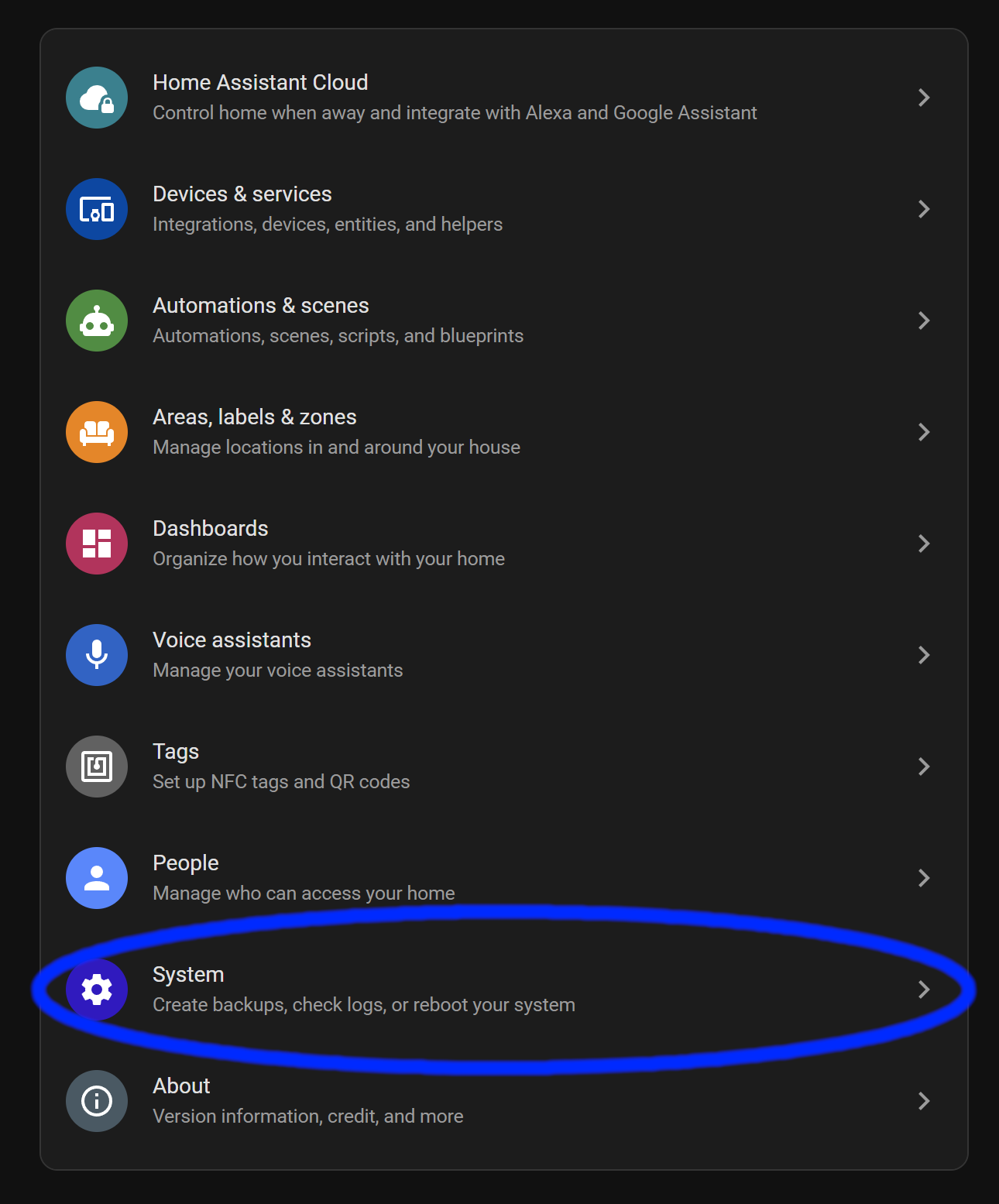
    First, we go to your Settings

    Home Assistant, click settings
    Right Arrow Blue: https://pixabay.com/vectors/arrow-left-pointing-previous-31182/

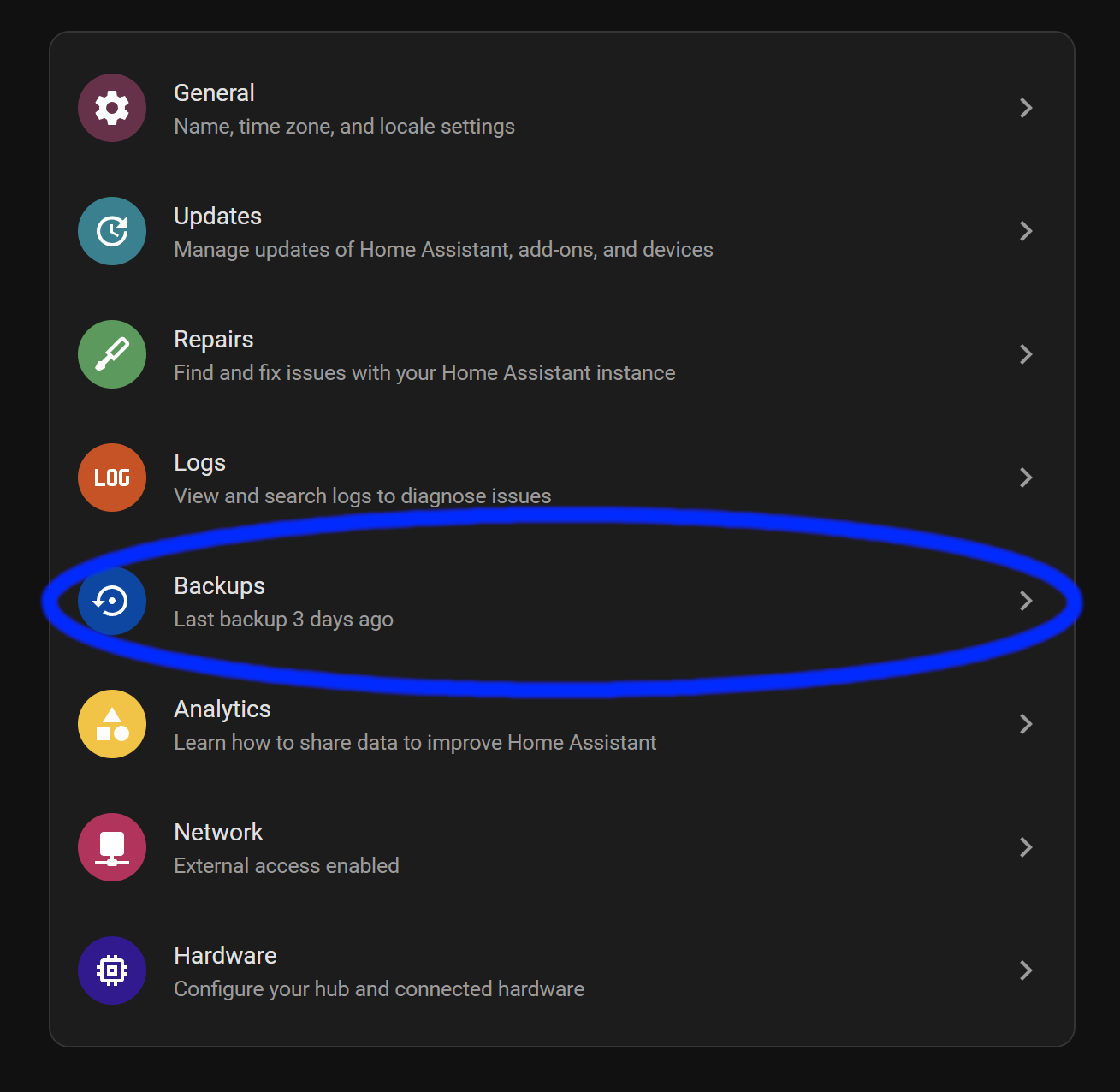
    Then Backups

    Home Assistant, click Backups

    Before you continue, make sure you have a new backup and download it to your computer so we can upload it later. If you’re using Home Assistant Cloud, you just have to make a new backup and upload it to the cloud if you want to restore from the cloud.

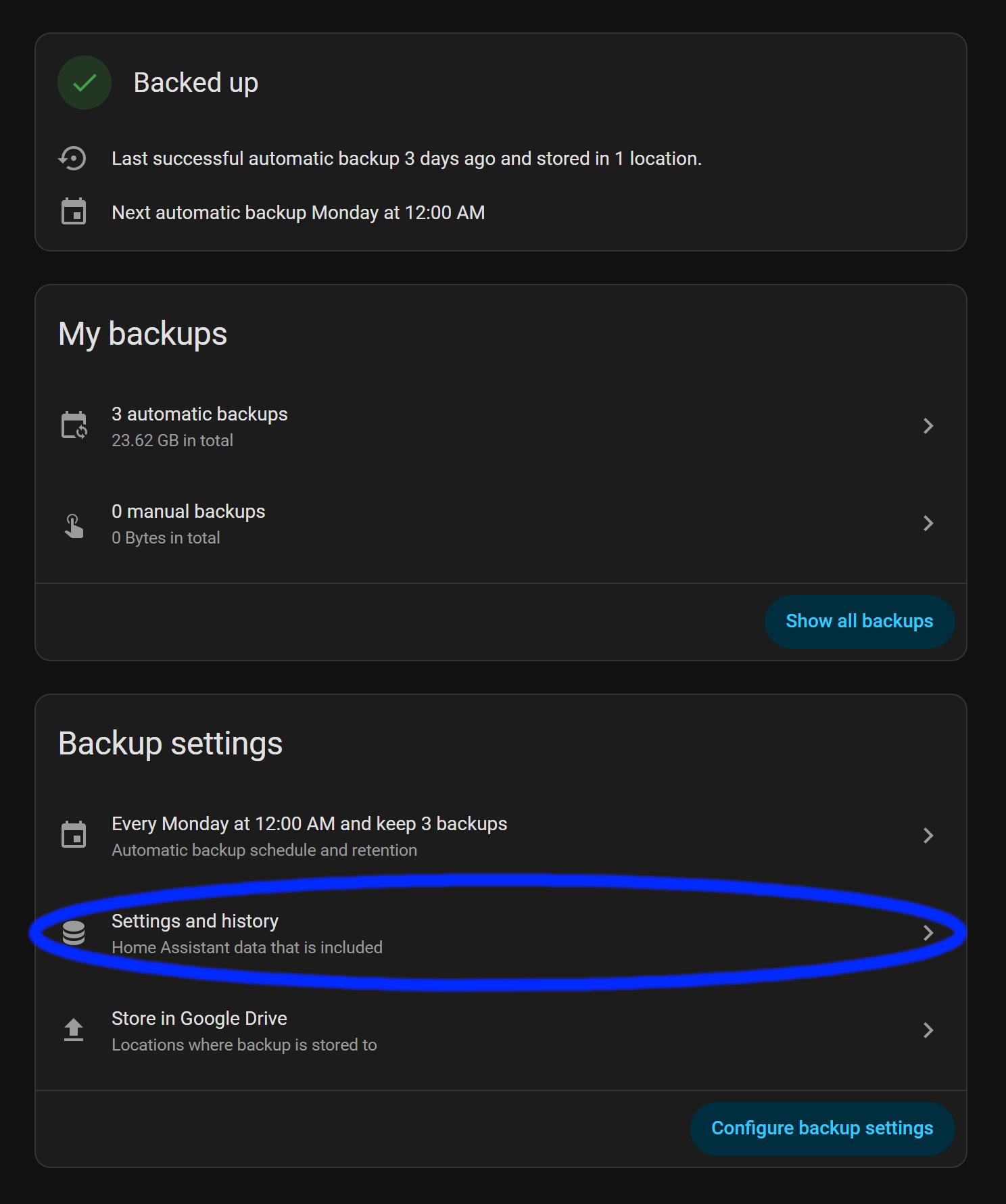
    Click Settings and History

    Home Assistant, click Settings and History
    Right Arrow Blue: https://pixabay.com/vectors/arrow-left-pointing-previous-31182/

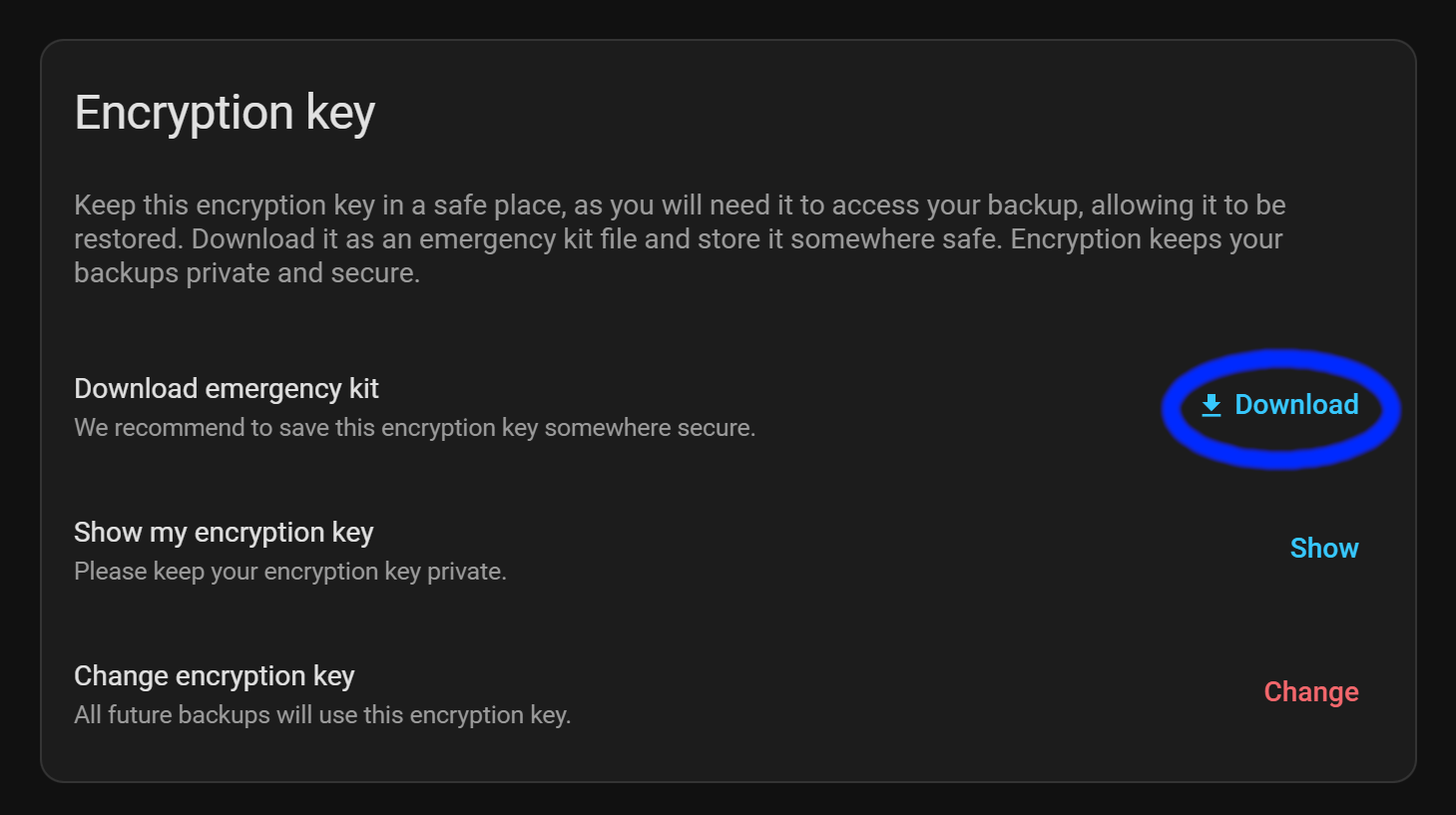
    Download your Emergency Kit txt file

    Home Assistant, download Emergency Kit

    We have to make sure you have your emergency kit downloaded so we can use your encryption key when you restore from your backup.

    After the Emergency Kit is downloaded, go back.

    Right Arrow Blue: https://pixabay.com/vectors/arrow-left-pointing-previous-31182/

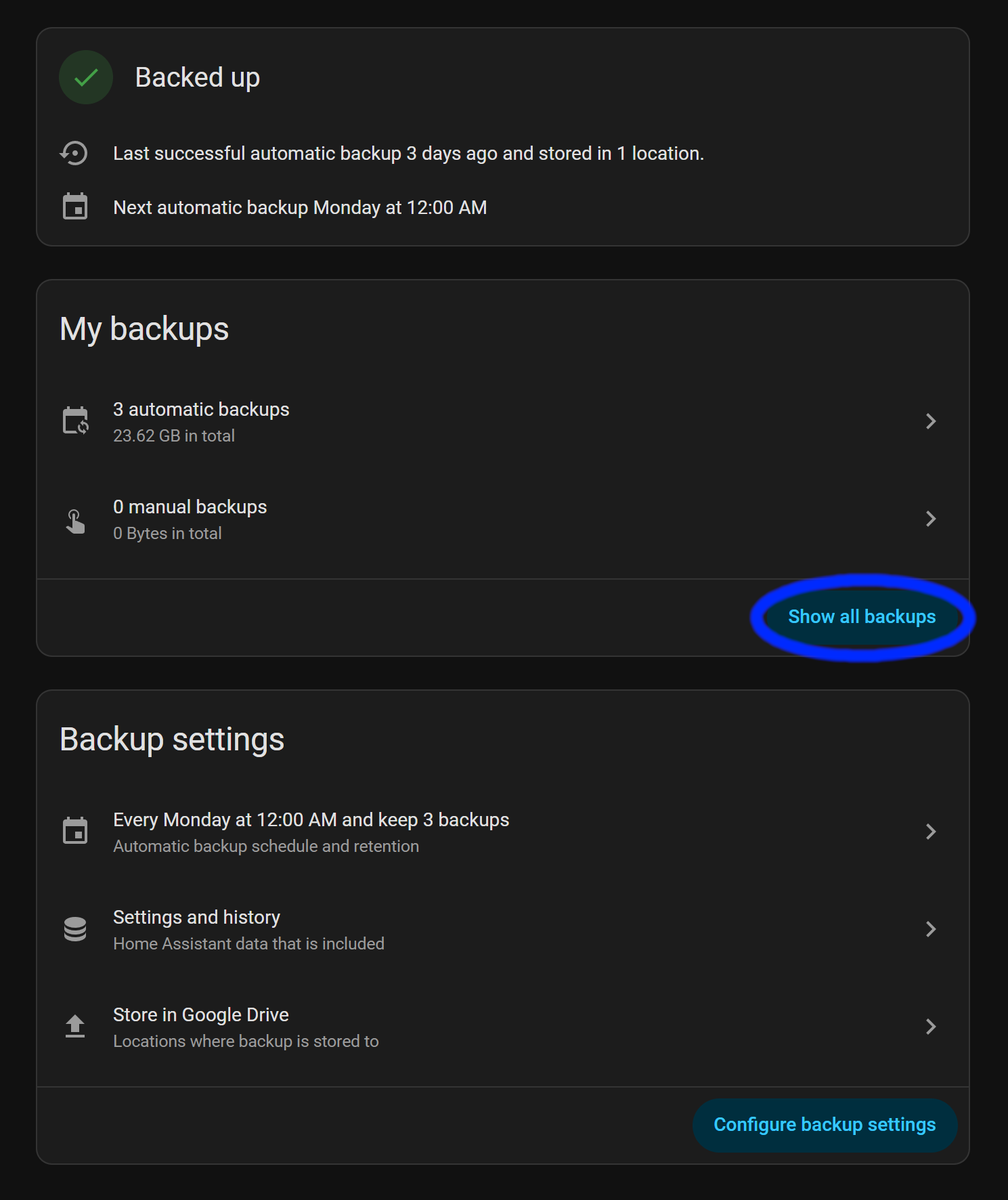
    Click Show Backups

    Now we go and download your latest backup.

    Click the three vertical dots

    Home Assistant,  download backup
    Right Arrow Blue: https://pixabay.com/vectors/arrow-left-pointing-previous-31182/

    Click on download.

    This will take a while if your backup is large.

    Home Assistant, download backup

    After that’s all done, we can continue on!

    While that is downloading, we should either create your compose file or set up Portainer.

    If you need to set up Docker, check this out!

    Compose File Creation

    Here is the basic Compose file for getting Home Assistant running in Docker.

    *Note* The official docs for installing Home Assistant in a Docker Container includes container_name: homeassistant above the line image: "ghcr.io/home-assistant/home-assistant:stable". Avoid container_name unless you have a specific need (legacy scripts, monitoring tools expecting a fixed name). Rely on the service name and Compose defaults for cleaner, more portable setups.

    services:
      homeassistant:
        image: "ghcr.io/home-assistant/home-assistant:stable"
        volumes:
          - /PATH_TO_YOUR_CONFIG:/config
          - /etc/localtime:/etc/localtime:ro
          - /run/dbus:/run/dbus:ro
        restart: unless-stopped
        privileged: true
        network_mode: host
    YAML

    services is where we tell Docker that we’re creating a container.

    homeassistant is the name of the container when accessed with the Docker command line and other related things like networking, etc..

    image: "ghcr.io/home-assistant/home-assistant:stable" tells Docker Compose that we want the latest stable image of Home Assistant.

    services:
      homeassistant:
        container_name: homeassistant
        image: "ghcr.io/home-assistant/home-assistant:stable"
    YAML

    Changing the config folder path

    Here is where we have to change /PATH_TO_YOUR_CONFIG to where you want to store your Home Assistant configuration files.

        volumes:
          - /PATH_TO_YOUR_CONFIG:/config
    YAML

    We have to create a folder like /home/hassio/home_assistant/ha_config, in my case, hassio is the username of this account. I created a folder home_assistant and then ha_config.

    I created two folders nearly named the same because I want to run some addons as well, so I put the config folder for each addon in home_assistant, then my Home Assistant configuration folder is ha_config.

    All you need to do is SSH into your device with something like Putty or CMD/Terminal. Log in as the user you want to manage the Home Assistant Docker setup with. In my case, it’s hassio. Then, create the folder or folders, as I did for my setup, or create a folder in your user’s home directory and call it good. It’s up to you what you want to do.

    Create a folder with:

    mkdir ha_config
    Bash

    Replacing ha_config with what you want to use, if you use a different name.

    Understanding the Configuration

        volumes:
          - /etc/localtime:/etc/localtime:ro
    YAML

    This line allows Home Assistant to read the time on your computer.
    Assuming it’s been set up already.

        volumes:
          - /run/dbus:/run/dbus:ro
    YAML

    This allows Home Assistant to communicate with the hostโ€™s system bus โ€” e.g., to talk to system services (BlueZ Bluetooth, systemd, Avahi, some hardware/service discovery daemons) that expose APIs over D-Bus. Home Assistant uses this to access some integrations that expect a system D-Bus to be available on the host.

        restart: unless-stopped
        privileged: true
        network_mode: host
    YAML

    restart: unless-stopped tells Docker to restart the container automatically if it exits (crashes, is killed, or the daemon restarts).

    privileged: true grants the container nearly every capability the host kernel gives processes โ€” roughly equivalent to giving the container full root-like access to the host.

    network_mode: host makes the container share the hostโ€™s network stack. Practically: the container has the hostโ€™s IP addresses and network interfaces. It does not get its own isolated network namespace. In this mode, you do not need ports: mappings โ€” the container listens on the host interfaces directly, localhost inside the container == localhost on the host, service discovery via Docker networks (service-name DNS) does not apply for other containers โ€” host networking bypasses those DNS aliases.

    Make sure you save the file, then we can continue!

    Setting up the Container in Portainer

    First, we have to navigate to the Portainer host. If you need help with setting up, check out this post!

    Next, we have to start creating a new container.

    We are going to be using the following details to input into Portainer.

    services:
      homeassistant:
        image: "ghcr.io/home-assistant/home-assistant:stable"
        volumes:
          - /PATH_TO_YOUR_CONFIG:/config
          - /etc/localtime:/etc/localtime:ro
          - /run/dbus:/run/dbus:ro
        restart: unless-stopped
        privileged: true
        network_mode: host
    YAML

    First, we navigate to the containers section and click on Create Container

    Then select New Container on the top right

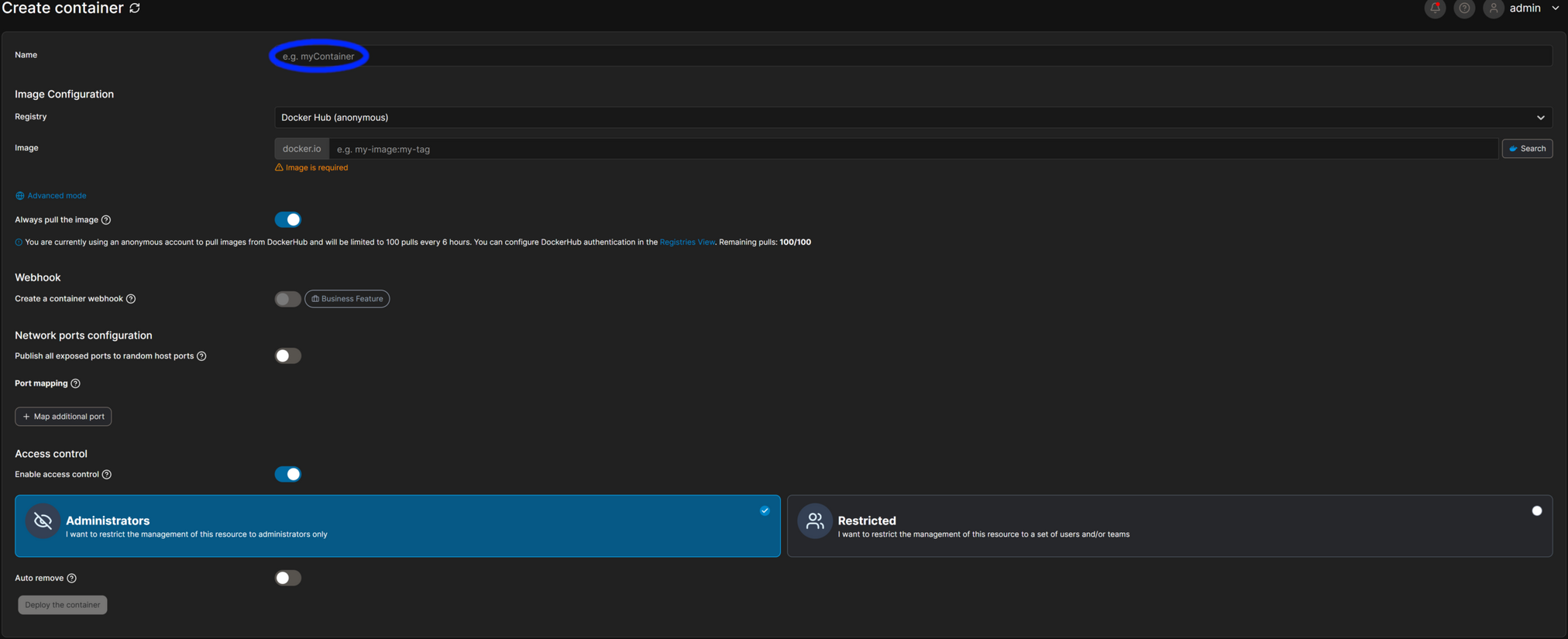
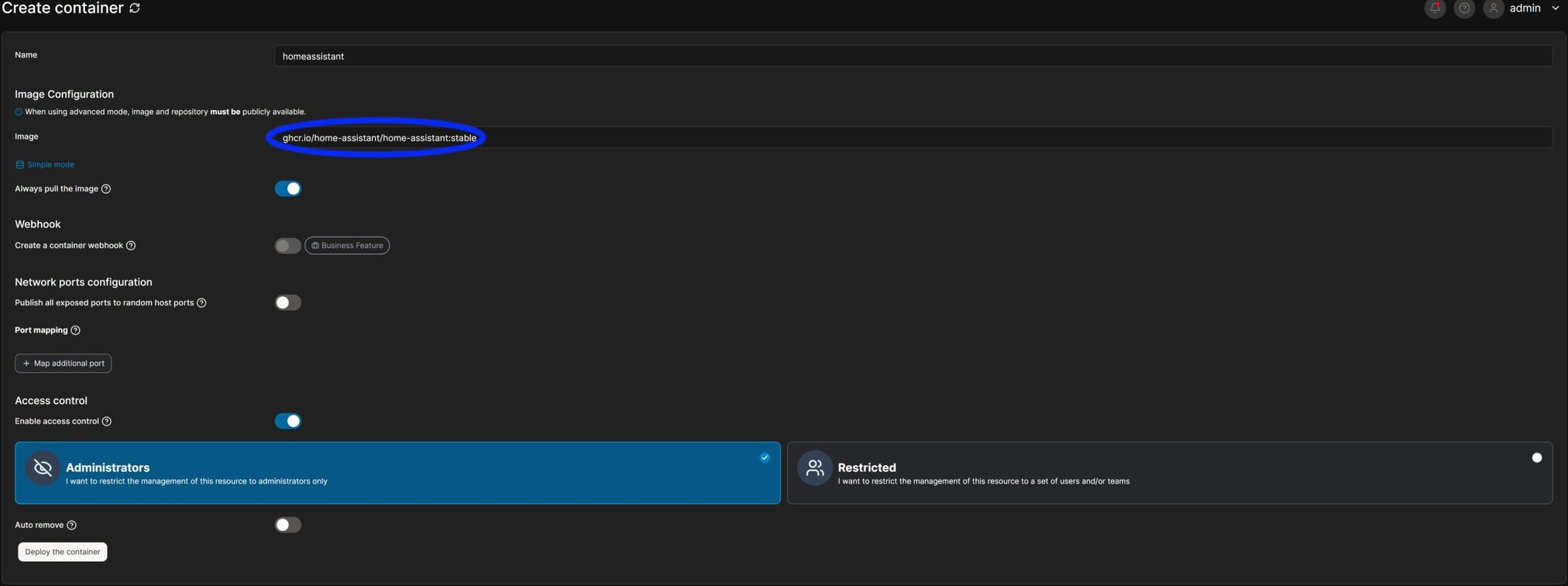
    You should get a page like this, where we can put the name of the container from line #2 from above.

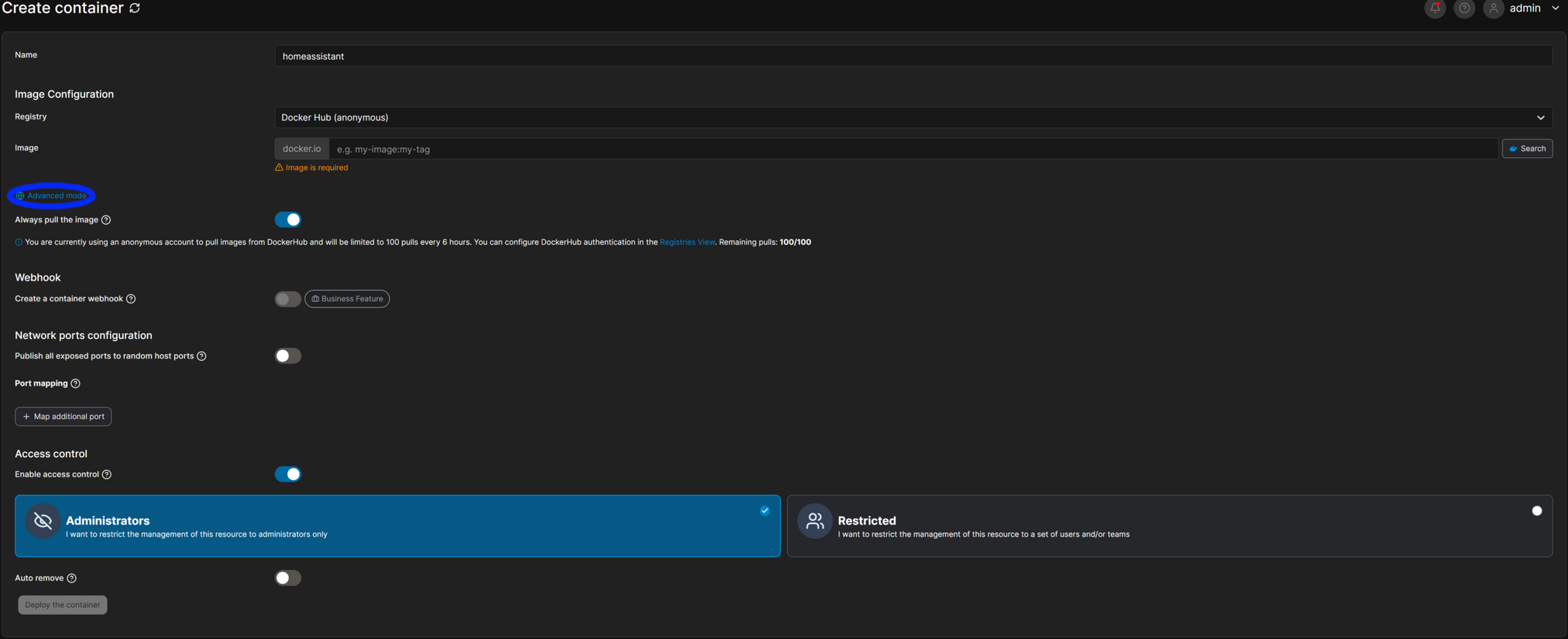
    Now we click on Advanced

    Paste the URL from the image section, copying between the quotes

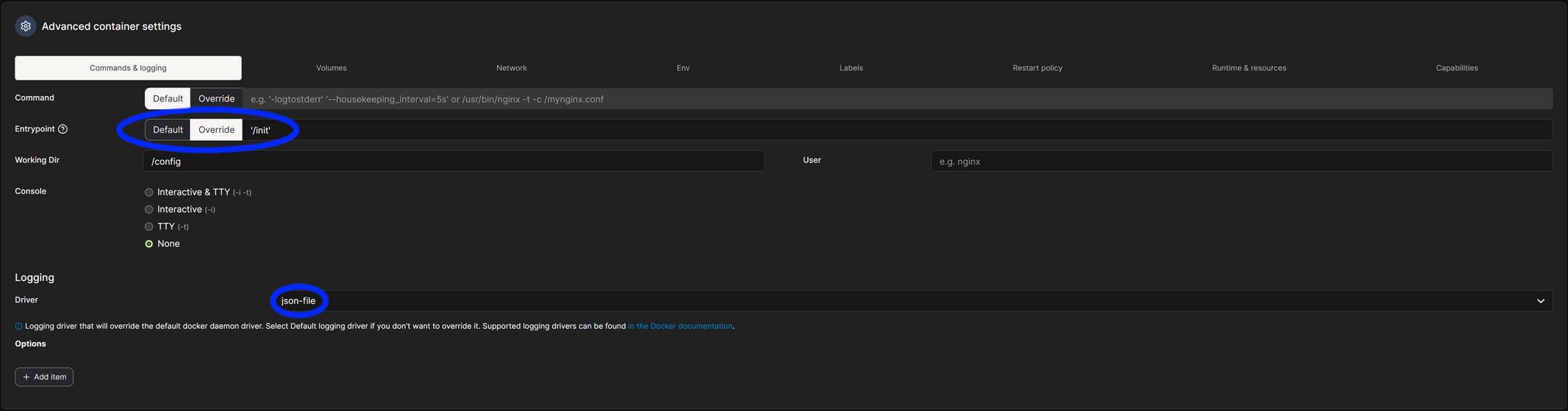
    Set the Entrypoint to '/init' and the Logging Driver to json-file

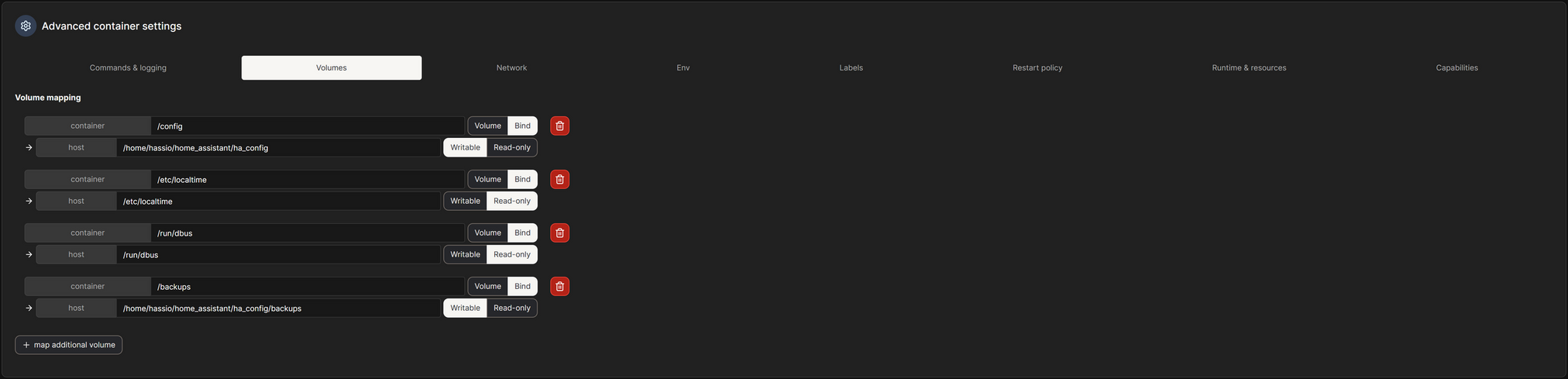
    Set your volumes, copying everything from the volumes section from above. Replace the host /config section and optionally set the /backups folder if you want to set a backup location on your host

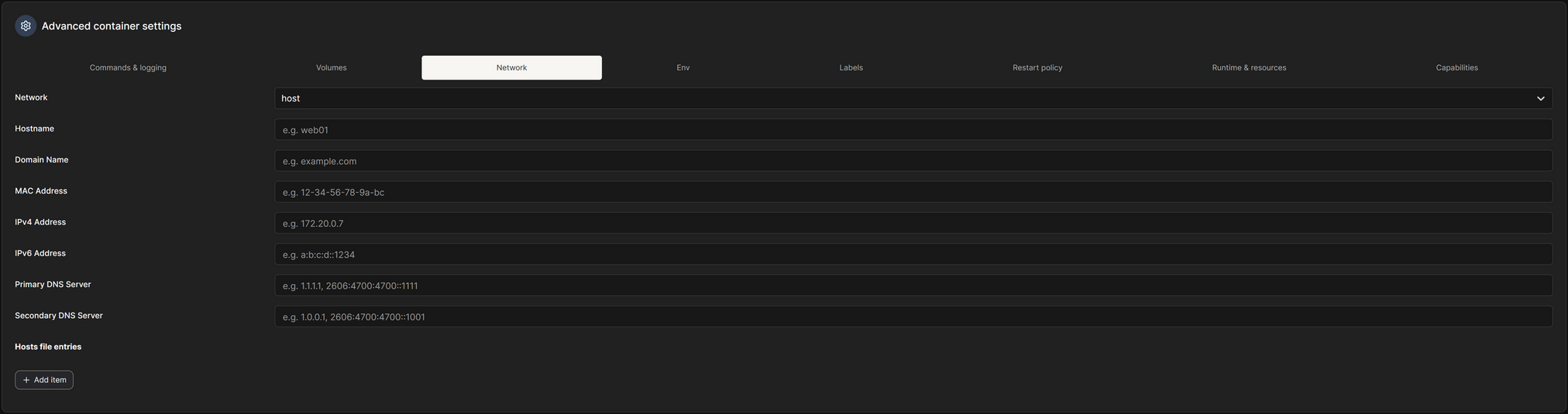
    Set your Network to Host

    Set your timezone and, optionally, the PUID and GUID to the user’s home folder that you’re putting the files in, so you don’t run into any folder/file permission issues

    Set your Restart Policy

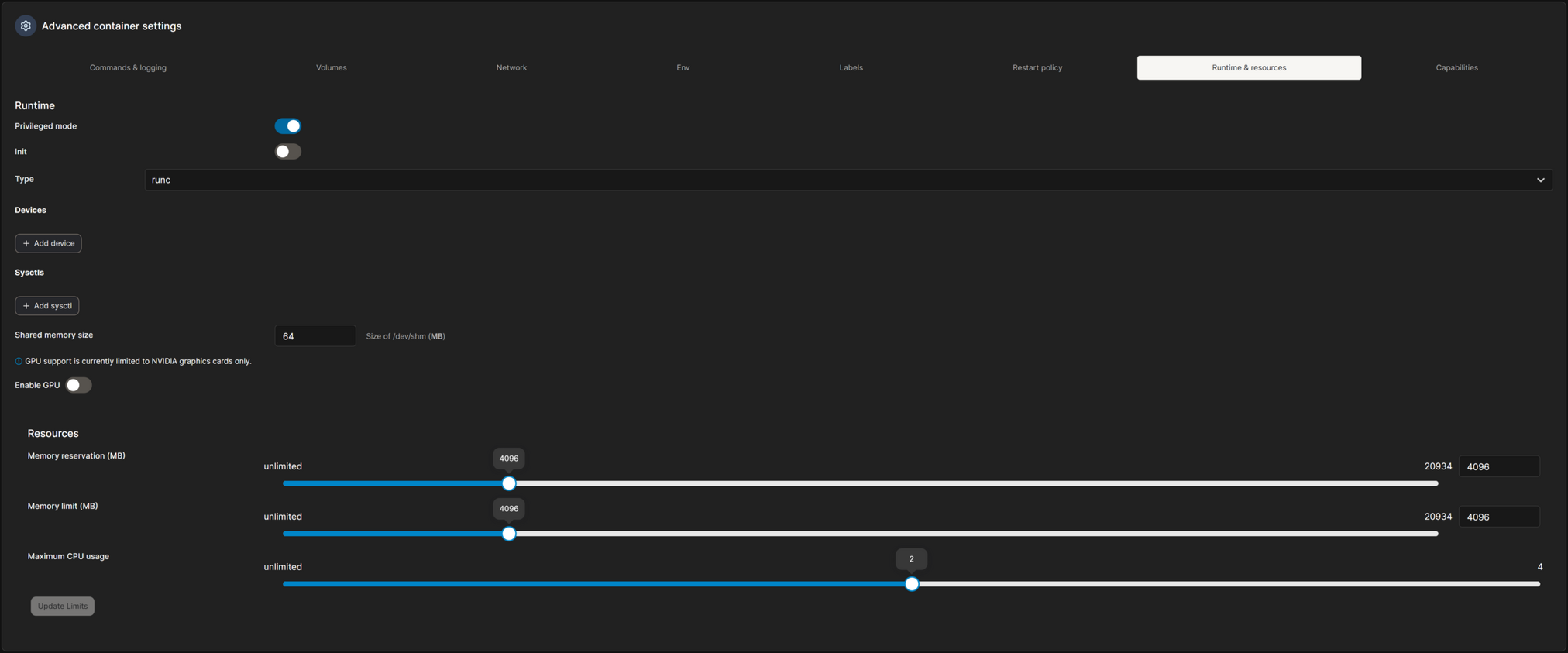
    Here we set the Privileged Mode, and any Devices that you need to mount. Optionally, but recommended, set the Resources to a max of what I have set here.
    I have 5.840 Entities, 4,297 Sensors, 160 Integrations, and 103 Automations. I have no issues running Home Assistant with these restrictions.

    Now we can click Deploy to download the image and start the container!

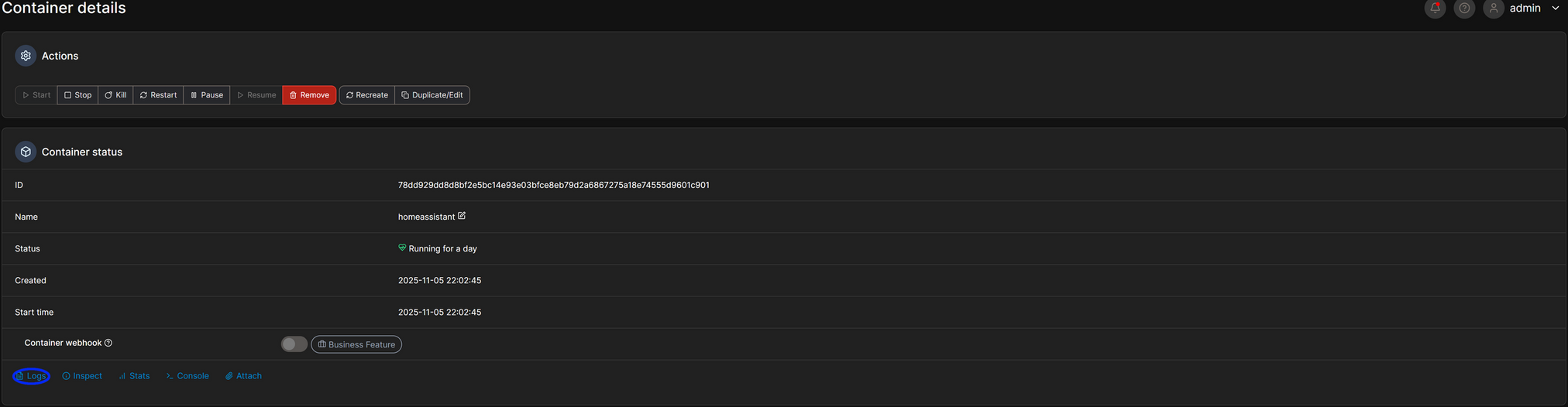
    Check the logs of the container with the logs button:

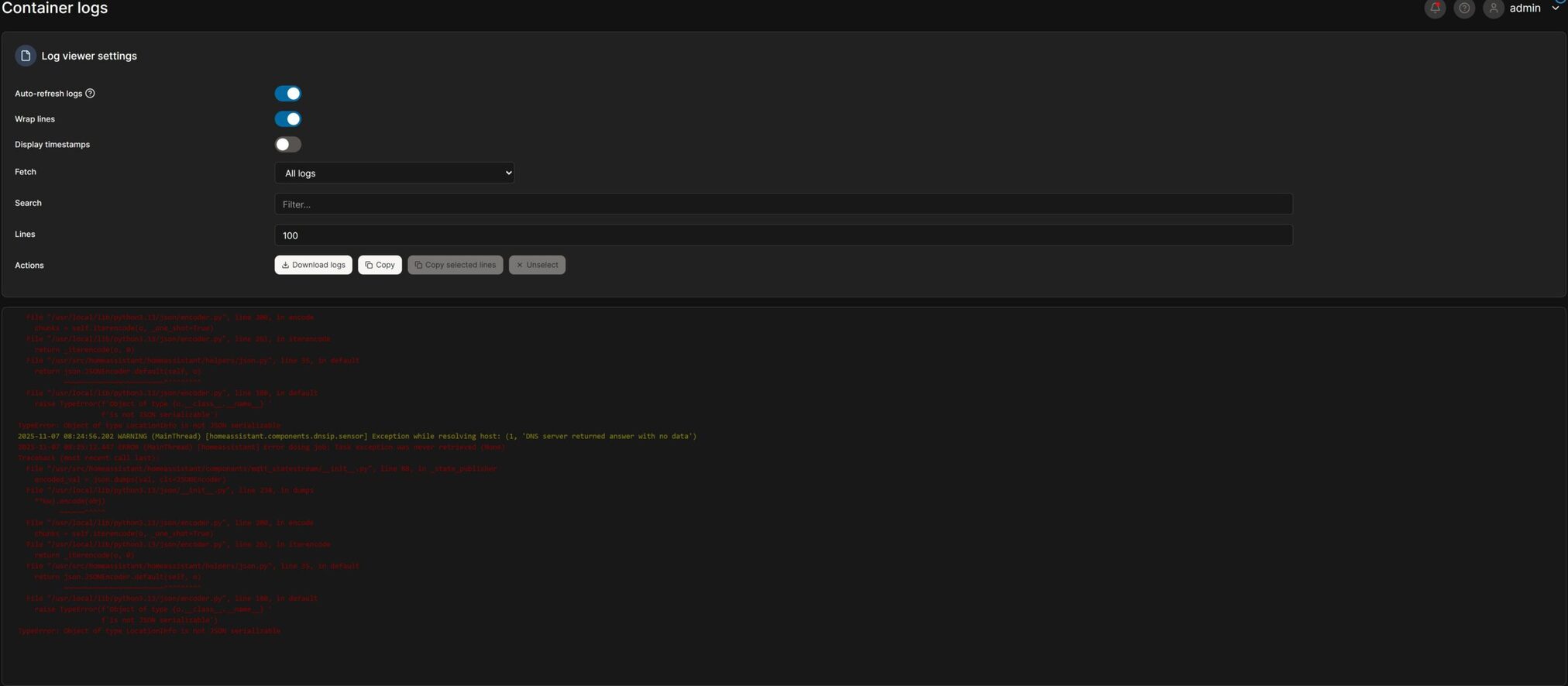
    You will now see the current logs of Home Assistant, and it will tell you if anything is wrong. You can set the log’s lines higher if you need to and make sure to turn off auto refresh if you need to read anything, as it refreshes every few seconds, so you can see the latest entries. Don’t mind the red as one of my sensors in complaining.

    You should now be all set to use Home Assistant!

    Starting the Container with Docker Compose

    Now we should be ready to start up Home Assistant for the first time!

    All you need to do to start the container is type:

    # run with sudo if your user isn't a part of the docker group
    # change the .yaml file to the one that you created
    docker compose compose.yaml up -d
    Bash

    We can check the logs of Home Assistant with:

    # run with sudo if your user isn't a part of the docker group
    # replace homeassistant with the name of the service that you set in the compose file from before
    docker compose -f homeassistant
    Bash

    Assuming everything went well, you should be ready to configure Home Assistant itself!

    Here is a quick cheat sheet for Docker Compose!

    # remember to add sudo if your user isn't a part of the docker group!
    # bring up all services in foreground (attach)
    docker compose up
    
    # bring up in background (detached)
    docker compose up -d
    
    # rebuild images then up
    docker compose up -d --build
    
    # stop services (but keep containers)
    docker compose stop
    
    # start stopped services (existing containers)
    docker compose start
    
    # restart services
    docker compose restart
    
    # show running compose containers for the project
    docker compose ps
    
    # show logs (follow)
    docker compose logs -f
    # logs for a single service:
    docker compose logs -f web
    
    # execute a shell in a running container
    docker compose exec web /bin/bash
    # or if you need tty:
    docker compose exec -T web /bin/bash
    
    # run a one-off command (creates a temporary container using service definition)
    docker compose run --rm web bash
    
    # bring everything down (stop + remove containers, networks)
    docker compose down
    
    # remove stopped containers, networks, images not used by any service
    docker compose down --rmi all --volumes --remove-orphans
    
    # build images only
    docker compose build
    
    # pull images only
    docker compose pull
    Bash

    Have fun with the greatest home automation platform in the world(in my opinion)!

    If you need any support, feel free to leave a comment or message me on one of my socials! Just make sure to keep it relevant as I get a lot of scam messages and I don’t have a lot of time to waste on spam lol.

    I hope you have fun and have a great day!

  • Installing Docker on Debian

    Here’s a quick tutorial on installing Docker and Docker Compose V2 on Debian! This requires that your account has sudo access.

    First, we have to make sure that we have possible conflicting packages removed. Debian may ship older/unofficial packages that conflict with Dockerโ€™s official packages.

    sudo apt remove docker docker-engine docker.io containerd runc docker-compose docker-doc podman-docker
    Bash

    After that finishes, we can start installing Docker. Enter these line by line, minus the added comment(#) lines.

    sudo apt update
    sudo apt install -y ca-certificates curl gnupg lsb-release
    
    # Create keyring dir (if not exists) and add Docker GPG key
    sudo mkdir -p /etc/apt/keyrings
    curl -fsSL https://download.docker.com/linux/debian/gpg | sudo gpg --dearmor -o /etc/apt/keyrings/docker.gpg
    sudo chmod a+r /etc/apt/keyrings/docker.gpg
    
    # Add the Docker apt repo (uses your Debian codename)
    echo "deb [arch=$(dpkg --print-architecture) signed-by=/etc/apt/keyrings/docker.gpg] https://download.docker.com/linux/debian $(lsb_release -cs) stable" | sudo tee /etc/apt/sources.list.d/docker.list > /dev/null
    
    # Apply changes to apt
    sudo apt update
    Bash

    Next, we will install Docker Engine, the CLI, containerd, Buildx, and the Docker Compose plugin (Compose V2).

    sudo apt install docker-ce docker-ce-cli containerd.io docker-buildx-plugin docker-compose-plugin
    Bash

    Then we start and enable Docker.

    sudo systemctl enable --now docker
    Bash

    This is optional, but it’s nice to have.

    We can add the current user to the Docker group, so we don’t have to run sudo all the time when we use Docker commands.

    sudo usermod -aG docker $USER
    Bash

    After adding yourself to the Docker group, you must re-login to apply the changes.

    Next, we can verify it’s working with the commands.

    docker version
    sudo docker run --rm hello-world
    Bash

    The first one shows the version of Docker that is installed, while the second one runs the hello-world container.

    As of writing this, my Docker version outputs something like this:
    Client:
    Version: 26.1.5+dfsg1
    API version: 1.45
    Go version: go1.24.4
    Git commit: a72d7cd
    Built: Wed Jul 30 19:37:00 2025
    OS/Arch: linux/amd64
    Context: default
    Server:
    Engine:
    Version: 26.1.5+dfsg1
    API version: 1.45 (minimum version 1.24)
    Go version: go1.24.4
    Git commit: 411e817
    Built: Wed Jul 30 19:37:00 2025
    OS/Arch: linux/amd64
    Experimental: false
    containerd:
    Version: 1.7.24~ds1
    GitCommit: 1.7.24~ds1-6+b4
    runc:
    Version: 1.1.15+ds1
    GitCommit: 1.1.15+ds1-2+b4
    docker-init:
    Version: 0.19.0
    GitCommit:

    docker compose version
    Bash

    This one will tell you what version of Docker Compose you have installed.

    As of writing this, my Docker Compose version outputs:
    Docker Compose version v2.40.3

  • Debian, Give User Sudo Access

    Here’s a quick tutorial on giving a user sudo access on Debian.

    I’m going to assume SSH access is set up, and you can log in to root, or you have terminal access on the host system.

    After you’re logged in as root, all we have to do is run a simple command.

    usermod -AG sudo username
    Bash

    usermod means we want to modify the users on the system.

    -AG, A stands for add, and G stands for group.

    In this case, we want to add a user to the sudo group.

    Then username is the user you want to add to the group.

    Replace username with the user that you want to give sudo access to.

    If nothing shows up for an error, and it goes back to the enter command line. Something like root@debian-dell:~# then you’re all set!

    Leave a comment if you need any help.

    I hope you have fun and a great day!

  • Install Portainer on Debain

    Let’s get Portainer installed!

    You can either run these commands as ‘sudo’ or run ‘sudo -i’ to run these commands as root.

    All we need is at least SSH access and/or ftp access(to make it easier for file editing), but that is optional if you just want to quickly get this installed.

    Quick Rundown: All we need to do is SSH into the device we want to install Portainer on, configure the ‘compose.yaml’ file and run it.

    First, SSH into the device with your tool of choice. Ex. Putty, CMD, Terminal, etc.

    In my case, I use nano:

    Edit compose file with nano

    Paste this for the base config:

    services:
      portainer:
        image: portainer/portainer-ce:latest
        container_name: portainer
        restart: always
        ports:
          - "9443:9443"
        volumes:
          - /var/run/docker.sock:/var/run/docker.sock
          - /home/hassio/home_assistant/portainer_data:/data
        environment:
          - TZ=change_me
    YAML

    So we have:

    services:
      portainer:
        image: portainer/portainer-ce:latest
        container_name: portainer
    YAML

    Which defines the name of the container to Docker ‘portainer’, you will use this to modify the container later.

    image: portainer/portainer-ce:latest
    YAML

    Tells Docker what image to run. ‘portainer/portainer-ce‘ is Portainer’s Community Edition, ‘:latest’ is the tag, it will pull the newest latest tag on startup.

    restart: always
    YAML

    This is the Docker restart policy. If the container stops (or the host reboots), Docker will automatically try to start it.

        ports:
          - "9443:9443"
    YAML

    Maps host port 9443 to container port 9443. Portainer uses 9443 for the HTTPS web UI by default. After it starts, youโ€™ll access Portainer at https://<host-ip>:9443.

        volumes:
          - /var/run/docker.sock:/var/run/docker.sock
    YAML

    This binds the Docker socket into the container. This is what gives Portainer the ability to control Docker (list containers, start/stop, create volumes, etc.). VERY powerful: any process that can talk to the Docker socket can control the Docker daemon (and therefore the host).

        volumes:
          - /home/hassio/home_assistant/portainer_data:/data
    YAML

    A host directory mounted into the containerโ€™s /data โ€” used by Portainer to store its state (users, settings, DB). This ensures data persists after container upgrades.

    Make sure to create a folder so Portainer can store its data. In my case, I put it under my users folder ‘/home/hassio/home_assistant/portainer_data’, but you would probably want to do something like ‘/home/’your username’/portainer_data’ instead. If you copied the file, make sure to change ‘/home/hassio/home_assistant/portainer_data’ to what suits your needs.

        environment:
          - TZ=change_me
    YAML

    This sets the timezone inside the container so logs and scheduled tasks use that timezone. Cosmetic but helpful. Make sure to change the timezone name or delete it.

    All you have to do next is change the Timezone, based on the name you find here.

    You can see my post on how to set the timezone here if you need more info on that.

    sudo docker compose -f compose.yaml config
    Bash

    All you need to do next is run that command, replacing ‘compose.yaml’ with your filename, to validate your Compose file.

    sudo docker compose -f compose.yaml up -d
    Bash

    That brings the container up.

    sudo docker compose ps
    Bash

    You can see the status of your running containers with that.

    sudo docker ps --filter name=portainer
    Bash

    Or use this one to specifically see the status of Portainer if you have multiple containers running. Make sure to change ‘portainer’ to the name that was used in the configuration file.

    sudo docker compose logs -f portainer
    Bash

    With this one, you can see the log file.

    Now your Portainer container should be up and running!

    Navigate to ‘https://<host-ip>:9443’, replacing the port number if you changed it in the compose file and replacing ‘<host-ip>’ with the device’s actual IP address.

    Make sure to create a strong password, as anyone who has it will be able to change your containers and potentially do malicious things.

    Here is the Portainer Installation Documentation if you wish to view it.

    I hope this helped you out! Have a great day and have fun building containers!

    Leave a comment if you need any help. I’ll be glad to support you!

  • Docker Compose Set Timezone

    I’m going to assume you have SSH and/or ftp access to modify the ‘compose.yaml’ file that you intend to modify.

    All we need to do is add the ‘TZ’ variable to the environment section with your timezone name that you can get from Wikipedia here, like so.

    services:
      service_name:
        environment:
          - TZ=America/Edmonton
    YAML

    Portainer

    All you have to do for portainer is create a new environment variable called TZ with the value of your timezone, like so:

    Click Deploy just above the advanced section, then your container will be recreated with the new environment variable!

    Compose More Detailed Version

    Let’s edit the compose file:

    nano compose.yaml
    Bash

    or…

    sudo nano compose.yaml
    Bash

    Depending on what your permission for your file is.

    Edit your compose file:

    sudo nano compose.yaml

    Go to the Wikipedia page here and look up your Timezone in the table.

    Wikipedia Timezone Table - Timezone Identifier
    Nano Docker Compose edit file

    Copy/Paste the ‘TZ Identifier’ and add it to your Docker Compose file like so. If you don’t have the ‘environment’ section, you can copy and paste this.

        environment:
          - TZ=
    YAML

    Make sure you have 4 spaces from the start of the line and 2 spaces from the start of the ‘environment’ section on the next line for the ‘- TZ=’ section(6 from the beginning of the line). YAML is space-sensitive, so it will fail to compile if the spaces are wrong.

    You should validate the file to make sure you don’t get any errors. All you need to do is type.

    sudo docker compose -f compose.yaml config
    Bash

    In this command, we use ‘sudo docker compose -f’, which, in this case, the ‘-f’ tells Docker Compose that we are dealing with Compose configuration files. ‘compose.yaml’ is the name of the compose file in my case. Replace it with the name of your file. Finally, ‘config’ is the command that tells it that we will parse, resolve and render the compose file.

    You should get the output of the file if it validated correctly:

    Docker Compose validate config

    Now you can bring the container up with:

    Replace the ‘compose.yaml’ with your file name.

    sudo docker compose -f compose.yaml up -d
    Bash
  • Sir Flopโ€™s Collection of Sloths

    Sir Flop laying in his bed with his collection of Holmes Alive stuffed toys

    If there is one type of stuffed toy that Sir Flop canโ€™t get enough of, it would be his Sloths from Holmes Alive.

    He has managed to collect nearly every single one so far and has formed a small family, as shown above.

    From left to right, he has Valorie, Charlie, Christinem, Gena, Syd, and Syd #2. When we first got him Syd, he had to have another one in the car, which is why we have two of them. There’s no arguing with a Flop and his wishes for his comfort items.

    Sir Flop laying, wrapped in his blanket with his Syd
    Sir Flop laying on his bed with his two Syds and his Dog on top of him

    As you can tell, he quite enjoys lying with his Syds.

    Sir Flop lying on the bed with stuffies on him while surrounded by toys

    Even though we mess with him, in this case, he is unsure of the rocking cat toy, but he still loves them.

    Sir Flop lying on the bed in his PJs on his dog with his Syd

    Even surrounded by comfort in his PJs, he still needs his Dog and his Syd.

    Sir Flop playing with Christine
    Sir Flop super sleepy lying on the bed with his blanket on top, his head lifted, eyes closed, his dog underneath his chin, and Christine / Gina in front

    He does play with them because they squeak and/or crinkle, but that doesn’t mean he won’t sleep with them after.

    Sir Flop lying with Charlie, wrapped in his blanked in his bed on the couch
    Sir Flop lying in his bed, on our bed, with Christina and Gina
    Sir Flop lying on the couch, in his PJs with Christine

    It doesn’t matter where he’s always lying with his sloths.

    Sir Flop wrapped in his blanket and Valorie

    Even if he is wrapped in comfort, he must have a sloth toy.

    Syd the Sloth product packaging
    Syd the Sloth Personality Description

    They come with their own fun description that describes their own personality and traits.

    You can take a look at Syd on the Homes Alive product page if you wish.

    Hope you have a great day everyone!